

日本語 | English


システムの定期メンテナンス日時について
以下の機能について、定期的に利用不可の時間帯が発生します。予めご承知おきください。
・蔵書検索機能(「明治大学図書館」タブ):毎週月曜日7:20~7:50
・他大学検索機能(「他大学検索」タブ):毎月第4火曜日20:00~22:00
FAQ(English)
I want to save search conditions to use in a search at a later date. Can this be done?
Category:
5.1. Personal Services
You can check the search history by clicking the [Search History] button at the top of the screen.
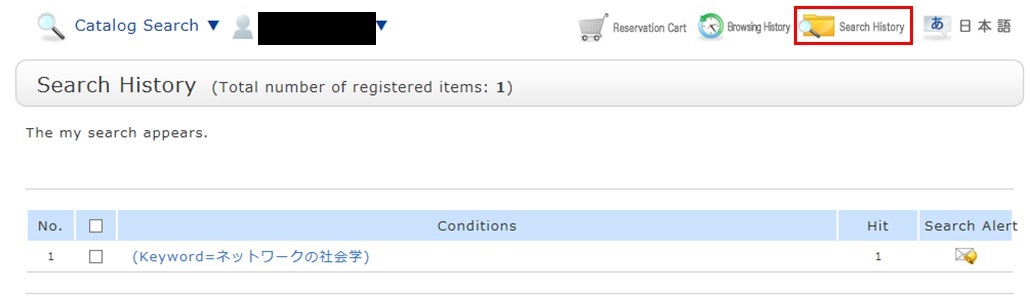
* The screenshot is the screen displayed when "Search History" is clicked.
To save search conditions until a later date by registering them from the search history browsing screen, enter a check mark in the check box of each search condition, and click the [Add to Favorites] button.
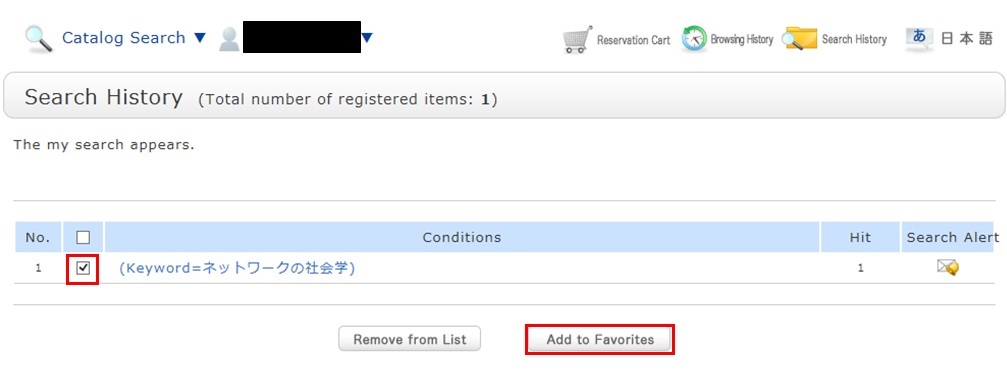
You can check the registered contents from My Search in OPAC.